
7. C1–C4 and module D
How to enter the end of life of a window or door in the EPD Generator: deconstruction, transport to waste processing, the end-of-life scenario per material, waste processing, and how the tool calculates module D.
7. C1–C4 and module D
The end-of-life stage contains deconstruction (C1), transport to waste processing (C2), waste processing (C3) and disposal (C4). Module D contains the benefits and loads beyond the system boundary (EN 15804+A2, 6.4.3.3). The method is in the methodology.
C1–C4 and module D are always declared.
What comes from the library
Each library material has an end-of-life (EoL) scenario. It gives the share of each route: reuse, recycling, energy recovery, incineration and landfill. It also gives the treatment data set of each route and the module D values. Dawn sets these values in the tool version. They include:
- The share that reaches the point of functional equivalence (Y).
- The value-correction factor (Q) and the point of substitution (P-52).
- The CH4 share and the capture rate of landfill gas (P-53).
- The secondary material (SM) of the material (P-55).
You cannot change these values on a library material. Your material can have a different recycled content from the library material. Then combine the recycled (100 % SM) and the virgin library materials in the part composition.
End-of-life scenario per material
The default shares of each material apply to your product. If you have evidence for other shares, change them for this product. (P-28)
- Open the product, and then the End of Life tab.
- For each material, enter the share of each route: 0–100 %.
- Make sure that the routes without a module D credit total 100 %.
- Save. The tool refuses a total other than 100 %.
Keep the source of the shares, for example national waste statistics for the market of the product. The treatment data sets behind the routes are fixed.
Deconstruction (C1)
- On the End of Life tab, under Disassembly, select Add disassembly utility. (P-29)
- Select the utility from the library, and enter the energy to remove one product from the building. The amount is more than 0.
If you enter nothing, C1 is declared as 0. Write the reason in the C1–C4 text, for example manual removal.
Transport to waste processing (C2)
- On the End of Life tab, under Transport to waste, select Configure transport route.
- Enter the legs, each with a transport mode from the library and a distance in km. (P-30)
The tool calculates the transported mass from the product. A product with no route has no C2 result.
Waste processing (C3)
If the product needs a processing step before the treatment, for example shredding, select Attach processing dataset. Select the data set and enter its amount. (P-31)
CAUTION: This data set is not part of the tool version, and the sealing check does not cover it. Select a data set of the system model of the tool version. Write down the reason for the data set.
Module D
The tool calculates module D from the net output flow of each substituted product. The net output flow is the gross output minus the secondary material input (S) of the same material. Only a positive net flow gets a credit. The credit is the net flow × Q × the data set of the substituted product. Exported energy (EEE, EET) gets a credit for the substituted energy.
To examine module D:
- Open the Impact tab, and then Resource use.
- Open Module D net flow.
- Examine each substituted product: gross output, S, net flow, Y, Q and the point of substitution.
- Examine the findings above the table, for example V-NET-3 ("Check the secondary material").
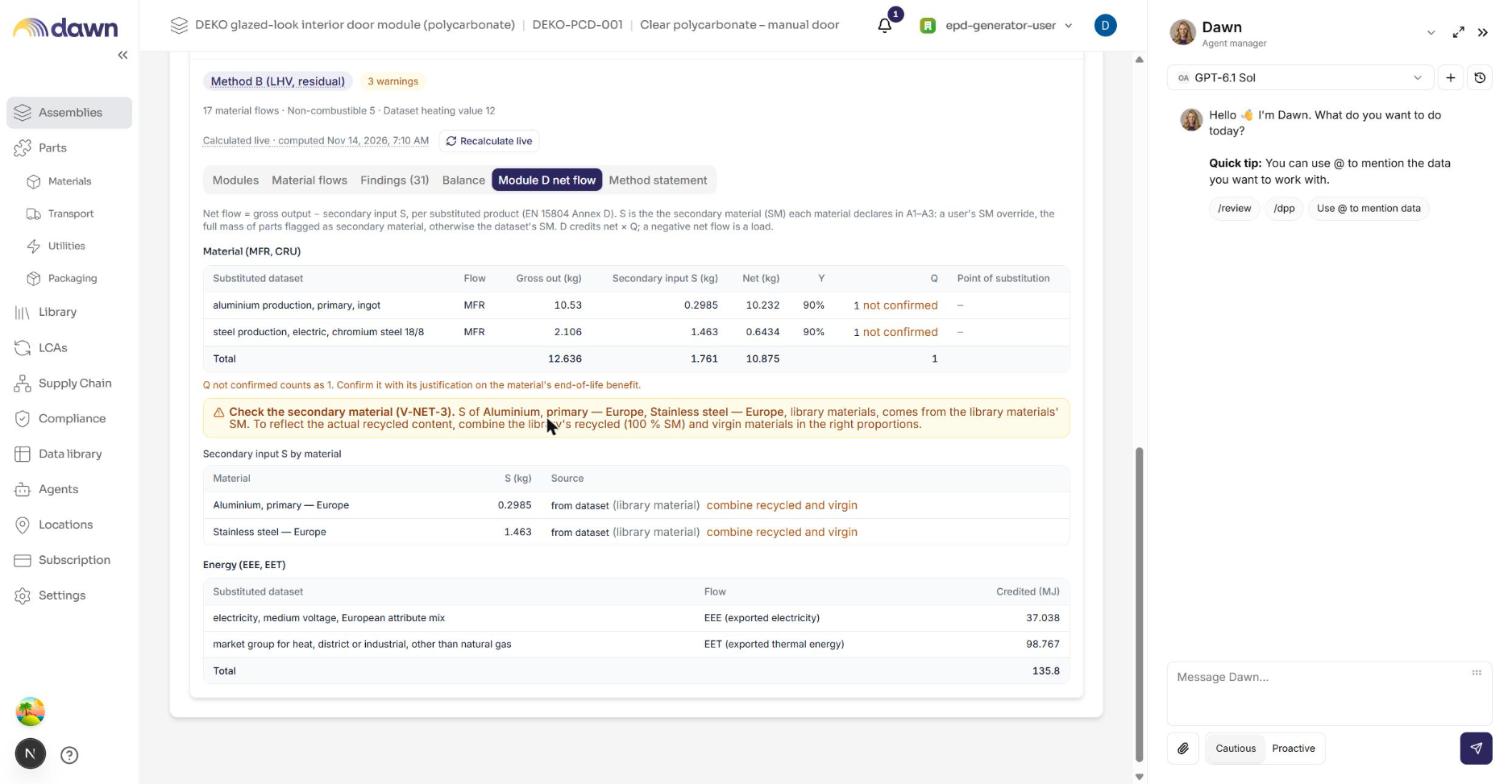
"Q not confirmed" means that the library material has no confirmed Q. The tool then uses Q = 1 and marks the module D scenario with a "Default" badge.
C1–C4 and module D scenario cards
On the EPD tab, under EPD details, the cards "End-of-life scenario (C1-C4)" and "Benefits scenario (D)" show the scenario information. The tool calculates each value from the end-of-life inputs. The values of the benefits scenario (D) also include the credits of parts exchanged in declared B2–B5 modules. (P-41)
- A "Default" badge on the CO2/CH4 split of landfill gas means that no landfill route states a CH4 share. The IPCC default of 50 % CH4 applies.
- A "Default" badge on the correction factor means that a Q is not confirmed.
- A changed value changes the declaration, not the results. The tool has no range check on it. Change a value only with a source.
